What Are the Latest SureIdP Features and Updates in 2026?
Enterprise identity management is changing rapidly. As organisations adopt cloud applications, hybrid work environments, and shared workplace devices, controlling who can access business systems has become a critical part of cybersecurity.
Traditional username-and-password authentication is no longer sufficient to protect modern enterprise environments. Organisations need stronger authentication, centralised identity management, device-aware access policies, and better visibility into user activities.
To address these requirements, 42Gears has introduced several updates to SureIdP, its identity and access management solution.
The November 2026 feature updates bring improvements across Microsoft Entra ID integration, On-Premises Active Directory synchronisation, passwordless authentication, multi-factor authentication (MFA), Conditional Access, and centralised audit logging.
But what do these changes actually mean for businesses? And how can IT teams use them to improve identity security?
Let's examine the latest SureIdP features and their practical implications for enterprise IT environments.
What Is SureIdP in simple terms?
SureIdP is an Identity and Access Management (IAM) solution from 42Gears that helps organisations manage user authentication and application access through a centralised identity infrastructure.
It enables businesses to strengthen authentication, simplify application access, and enforce security policies across different enterprise environments.
Its capabilities include:
Single Sign-On (SSO): Allows employees to access multiple supported applications through a centralised authentication process.
Multi-Factor Authentication (MFA): Adds additional verification requirements beyond passwords.
Passwordless Authentication: Supports modern authentication methods that reduce dependence on traditional passwords.
Conditional Access: Helps organisations control application access based on user and device-related conditions.
Identity Integration: Connects existing identity environments, including Microsoft Entra ID and On-Premises Active Directory.
The latest updates expand these capabilities to address the requirements of organisations operating across cloud, on-premises, and frontline environments.
1. What Is New in SureIdP's Microsoft Entra ID Integration?
Microsoft Entra ID is widely used by enterprises to manage employee identities and control access to business applications.
However, organisations often work with multiple applications, authentication protocols, and business domains. Managing these environments independently can increase administrative complexity.
SureIdP introduces three important improvements to Microsoft Entra integration.
Microsoft Entra External Authentication Method (EAM) Support
SureIdP now supports integration with Microsoft Entra ID as an External Authentication Method (EAM).
This allows organisations to incorporate SureIdP into their existing Microsoft Entra authentication workflows without completely replacing their primary identity infrastructure.
For example, a business already using Microsoft Entra ID can introduce SureIdP as an external authentication method when additional authentication is required.
Why does this matter?
Extends existing Microsoft Entra authentication workflows.
Provides additional flexibility in authentication architecture.
Helps organisations build on their existing identity investments.
Reduces the need for a complete identity infrastructure replacement.
Multi-Domain Federation Within a Single Microsoft Entra Tenant
Large organisations frequently operate multiple business domains across subsidiaries, departments, and geographical locations.
Managing separate identity environments for these domains can create unnecessary complexity.
SureIdP now supports multi-domain federation with domain-level access control within a single Microsoft Entra tenant.
This enables IT administrators to manage multiple domains while maintaining separate access requirements for different business units.
Business benefit: Organisations can simplify identity administration while retaining greater control over authentication across their business domains.
Direct Authentication Through Microsoft Entra ID
SureIdP also supports delegating user authentication directly to Microsoft Entra ID.
Employees can use their existing corporate credentials to authenticate to applications integrated with SureIdP.
This reduces the requirement for separate application-specific credentials and helps organisations maintain a more consistent authentication experience.
2. How Does SureIdP Improve On-Premises Active Directory Management?
Many enterprises still depend on On-Premises Active Directory (AD) to manage employee accounts, authentication, and access permissions.
At the same time, their applications and workloads are increasingly moving towards cloud-based environments.
This creates a challenge: maintaining consistent identity information and authentication policies across on-premises and cloud infrastructure.
The latest SureIdP updates introduce three improvements.
Active Directory User Synchronisation
SureIdP now supports synchronising user credentials from On-Premises Active Directory.
This helps organisations extend their existing directory infrastructure into SureIdP without requiring a complete migration of employee accounts.
IT administrators can work with existing AD-synchronised users instead of creating and maintaining separate accounts manually.
Password Synchronisation for AD Users
Password mismatches between different identity systems can lead to repeated login failures and unnecessary support requests.
SureIdP now supports password synchronisation for users synchronised from On-Premises Active Directory.
When employees change their passwords in Active Directory, the connected identity environment can maintain consistent credentials.
Why is this useful?
Reduces password inconsistencies.
Helps prevent avoidable authentication failures.
Simplifies credential administration.
Improves the employee login experience.
MFA for Active Directory-Synchronised Users
Another important improvement is MFA support for users synchronised from On-Premises Active Directory.
Administrators can apply additional authentication requirements to these accounts through SureIdP.
This is important because passwords alone cannot provide sufficient protection against compromised credentials.
For example, if an attacker obtains an employee's password through phishing, MFA introduces another verification requirement before access is granted.
This helps strengthen authentication across existing enterprise directory environments.
3. How Does SureIdP Make Shared Device Authentication Faster?
Shared devices are widely used in industries where employees work in shifts or operate from common workstations.
Examples include:
Manufacturing facilities
Hospitals and healthcare organisations
Warehouses and logistics centres
Retail stores
Educational institutions
When several employees use the same device, repeatedly entering usernames and passwords can slow down operations.
SureIdP introduces NFC, QR-code, and FIDO2-based authentication improvements for Shared Device Mode (SDM).
NFC and QR-Based User Identification
Employees can identify themselves by tapping an assigned NFC badge or scanning a QR code instead of manually entering their usernames every time they switch devices.
The process also supports six-digit PIN-based fast access.
Once authenticated, employees can access supported web applications through Single Sign-On, including Microsoft 365 applications.
Practical example:
Consider a manufacturing facility where multiple employees share tablets across different shifts.
Instead of repeatedly entering lengthy login credentials, an employee can identify themselves using an assigned NFC badge or QR code and complete the required authentication process.
This makes device handovers more efficient and reduces repetitive login activities.
FIDO2 and WebAuthn Passwordless Authentication
SureIdP also extends FIDO2/WebAuthn-based passwordless authentication to Shared Device Mode.
Employees can use registered FIDO2 security keys or NFC-enabled FIDO2 smart badges to authenticate.
Unlike conventional password-based login, this approach reduces dependence on manually entered passwords and PINs during normal FIDO2 authentication.
Key benefits:
Faster authentication for frontline employees.
Reduced dependence on traditional passwords.
Improved convenience during shift changes.
Support for modern passwordless authentication methods.
4. What New MFA and Passwordless Authentication Options Does SureIdP Offer?
Passwords remain one of the most common entry points exploited in cyberattacks.
Weak passwords, reused credentials, phishing attacks, and credential theft can expose sensitive enterprise applications.
SureIdP's latest updates expand authentication options to help organisations reduce these risks.
Passwordless Authentication for Application Access
SureIdP now supports passwordless authentication for application access.
Instead of relying entirely on traditional passwords, organisations can introduce modern authentication methods to simplify the login process.
Passwordless authentication can help reduce risks associated with weak or reused passwords, particularly when implemented with phishing-resistant methods.
SMS-Based and Email-Based OTP Authentication
SureIdP now supports two additional MFA methods:
SMS OTP: Users receive a one-time verification code through a text message.
Email OTP: Users receive a one-time verification code through their registered email address.
Administrators can configure these authentication methods at the domain level.
This gives businesses greater flexibility when deciding how employees should verify their identities.
However, organisations should understand that SMS and email OTP methods are not equally resistant to phishing and interception. For high-risk accounts, phishing-resistant authentication such as FIDO2 is generally preferable.
OpenID Connect (OIDC) Application Integration
Another significant update is support for OpenID Connect (OIDC), alongside existing Security Assertion Markup Language (SAML) integration.
Both technologies help applications use a centralised identity provider for authentication.
The difference is that OIDC is built on OAuth 2.0 and uses standardised identity tokens, making it suitable for many modern web and mobile applications.
With OIDC support, SureIdP can extend centralised authentication to a broader range of applications.
Why does this matter?
Supports modern application authentication requirements.
Expands integration options beyond SAML.
Helps connect cloud-native and enterprise applications.
Reduces the need to maintain separate authentication systems.
5. How Does SureIdP Conditional Access Improve Application Security?
Not every login attempt should automatically receive access simply because a user has valid credentials.
For example, an employee accessing a sensitive business application from a managed corporate device presents a different risk scenario from someone attempting access through an unmanaged device.
SureIdP expands Conditional Access support to applications integrated through:
Microsoft Entra ID
Okta
Google Workspace
Custom SAML applications
Custom OIDC applications
Administrators can configure access policies based on factors such as user identity, operating system, and device management status.
Example:
An organisation may allow employees to access a financial application from approved, managed devices while restricting access from unsupported or unmanaged devices.
This helps IT teams move towards context-aware access management rather than relying exclusively on usernames and passwords.
Conditional Access is particularly useful for organisations with remote employees, BYOD environments, and multiple application platforms.
6. What New User Account Security Features Have Been Added?
Managing identities also involves protecting accounts throughout their lifecycle.
SureIdP introduces additional controls that help administrators manage password security and respond to unsuccessful authentication attempts.
Mandatory Password Change After Administrator Reset
When an administrator resets a user's password, SureIdP can require that employee to change the password during their next login.
This helps ensure temporary credentials do not remain in use longer than necessary.
Configurable Password Expiration Notifications
Employees can now receive configurable password expiration alerts directly on their devices.
These notifications help users update their passwords before expiration.
This can reduce unexpected login disruptions and avoid unnecessary password-related support requests.
Automatic Account Lockout After Failed Login Attempts
SureIdP can automatically lock user accounts after a predefined number of unsuccessful login attempts.
This provides an additional security control against repeated password-guessing attempts.
For example, if an account receives multiple unsuccessful login attempts, the configured lockout policy can prevent further authentication attempts once its threshold is reached.
This helps reduce exposure to brute-force attacks, although account lockout policies should be configured carefully to avoid attackers deliberately locking out legitimate employees.
7. Why Are Centralised Audit Logs Important in SureIdP?
Visibility into identity-related activities is essential for security monitoring, troubleshooting, and compliance.
Without reliable audit records, IT administrators may struggle to determine who accessed an application, which administrator modified an account, or why a user experienced repeated authentication failures.
SureIdP now provides centralised, immutable audit logs covering:
Identity-related activities.
Operating system logins.
Application access.
Administrator actions.
These records help IT and security teams understand what happened, when an activity occurred, and which user or administrator was involved.
For example:
If an employee reports an unexpected account lockout, administrators can review relevant identity records to investigate the issue.
Similarly, during a security investigation, audit records can help establish whether an account modification or application access event was legitimate.
Centralised logging can also support internal security reviews and compliance evidence collection.
However, audit logs should be part of a wider monitoring strategy that includes appropriate log retention, access controls, alerting, and incident response processes.
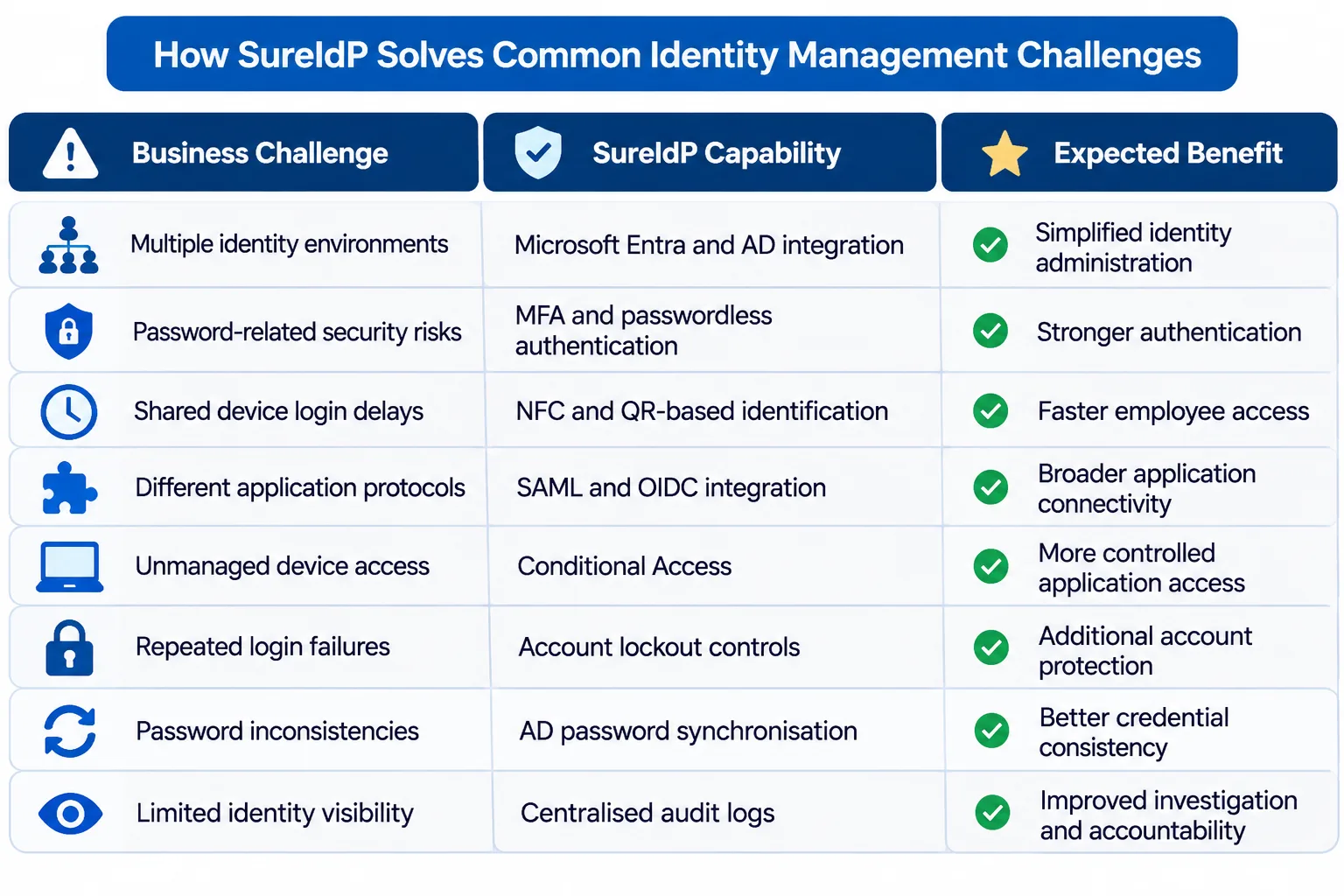
8. What Are the Main Business Benefits of the Latest SureIdP Updates?
The latest updates are not simply additional technical features. They address common identity management challenges faced by enterprise IT teams.
Here is how organisations can benefit:
9. Which Organisations Can Benefit From These SureIdP Features?
These updates are particularly relevant to organisations managing multiple applications, large employee directories, and distributed device environments.
Manufacturing: NFC-based authentication and shared device access can simplify employee authentication across production floors and shift-based operations.
Healthcare: Hospitals can benefit from streamlined shared-device authentication and stronger access controls for employees using common workstations.
Retail and Logistics: QR and NFC-based identification can make employee device handovers more efficient across stores, warehouses, and distribution centres.
Banking and Financial Services: MFA, Conditional Access, and centralised audit logs can support stronger identity security and better visibility into authentication activities.
IT and Enterprise Organisations: Microsoft Entra integration, Active Directory synchronisation, SAML, and OIDC support can help simplify identity management across hybrid IT environments.
The exact benefits will depend on application compatibility, device support, identity architecture, and the organisation's security policies.
10. Frequently Asked Questions About SureIdP
1. What is the latest version of SureIdP?
42Gears published a feature roundup on November 11, 2026, highlighting new capabilities across Microsoft Entra integration, On-Premises Active Directory, shared device authentication, MFA, OIDC, Conditional Access, account security, and audit logging. The article describes feature updates rather than specifying a single software version number.
2. Does SureIdP support Microsoft Entra ID?
Yes. SureIdP supports Microsoft Entra integration, including External Authentication Method support, multi-domain federation, and delegated authentication through Microsoft Entra ID.
3. Does SureIdP support passwordless authentication?
Yes. SureIdP supports passwordless application authentication and FIDO2/WebAuthn-based authentication for Shared Device Mode using registered security keys and NFC-enabled FIDO2 smart badges.
4. Can SureIdP integrate with On-Premises Active Directory?
Yes. SureIdP supports synchronising users from On-Premises Active Directory, including password synchronisation and MFA support for AD-synchronised users.
5. What authentication protocols does SureIdP support?
SureIdP supports SAML and OpenID Connect (OIDC) application integration, allowing organisations to centralise authentication across applications that support these protocols.
6. Does SureIdP support Conditional Access?
Yes. Its Conditional Access capabilities extend to applications integrated through Microsoft Entra ID, Okta, Google Workspace, and custom SAML or OIDC configurations. Policies can consider user identity, operating system, and device management status.
7. How does SureIdP help secure shared devices?
SureIdP supports NFC and QR-based user identification, six-digit PIN fast access, and FIDO2/WebAuthn-based passwordless authentication for Shared Device Mode. These capabilities help employees switch users more efficiently while maintaining individual authentication.
Conclusion: Is SureIdP Moving Towards More Comprehensive Enterprise Identity Security?
Enterprise identity management is no longer limited to creating user accounts and assigning passwords. Organisations must manage authentication across cloud applications, on-premises infrastructure, shared devices, and remote work environments.
The latest SureIdP updates address several of these requirements through stronger Microsoft Entra and Active Directory integration, expanded MFA options, passwordless authentication, OIDC support, Conditional Access, and centralised audit logging.
For IT administrators, these capabilities offer more flexibility in managing identities and controlling application access. For security teams, they provide additional controls and visibility to support a stronger identity security strategy.
As enterprises continue adopting hybrid infrastructure and Zero Trust security principles, identity management will remain a critical part of protecting business applications and corporate data.
The key takeaway: Securing enterprise access requires more than verifying a password. It requires continuously managing identities, authentication methods, devices, and access policies across the organisation.